A futuristic digital workspace with three holographic panels labeled ChatGPT, Claude, and Gemini, showcasing glowing icons and charts, as a business team eva…

Speed vs accuracy in your product: ChatGPT vs Claude vs Gemini

This article scores ChatGPT vs Claude vs Gemini against six real business tasks your team runs every week, then breaks down the seat and API costs most comparisons skip. You will finish able to map your top use cases to a concrete tool instead of trusting a demo.

Content authorNikita SivtsovPublished onReading time13 min read

Why one AI tool never wins

You picked your best AI assistant and wired your whole team into it, so now you run every job through the same box. That same box now handles cold emails and SQL fixes. It also handles contract reviews and blog drafts. Spreadsheet cleanups and support replies go through it too. Some come back great. Others come back generic, or confidently wrong, and you spend more time fixing the output than you saved. That gap is the reason you are reading this, and the reason a single-tool setup keeps disappointing you.

The frustration is rational because these models genuinely diverge. Claude Opus 4.5 tops SWE-bench Verified at 80.9% on real GitHub issues, narrowly ahead of GPT-5.2. Gemini 2.5 Pro carries a 1 million token context window that dwarfs what the others handle by default. The lead changes hands by task, with different winners for coding and long-document work. Real-time search has its own winner. Asking one model to win all of them is asking against how they were built.

So this piece scores ChatGPT vs Claude vs Gemini on narrow, realistic tasks tied to functions you recognize, and it names a winner for each. By the end you will have a way to match a tool to your own workflow.

Key Takeaways

  • Claude leads real-world coding with an 80.9% score on SWE-bench Verified and is the default model inside professional tools like Cursor and Aider.

  • Claude is calibrated to refuse when uncertain, which gives it the lowest hallucination behavior on knowledge benchmarks and makes it the safer pick for contract review.

  • Gemini integrates natively with Google Workspace across Gmail and Docs, with Sheets included in the same workflow. That makes it the default for teams already living in GDrive.

  • ChatGPT is the fastest drafting tool, and its flexibility makes it the strongest all-rounder for sales outreach and iterative content work.

  • ChatGPT Business and Claude Team both sit around $25 per seat monthly on annual billing, while Gemini rides inside Workspace tiers near $14 per user and up.

  • Gemini's API is the cheapest across tiers, with Flash-Lite at $0.10 per million input tokens, roughly 12 to 25 times cheaper than Claude Sonnet.

How we scored each tool

Four criteria run through every task below. First, accuracy on the specific job, or whether the output is correct. Second, hallucination rate, because a fabricated clause or a made-up function costs you more than a blank response. Third, how well the tool handles the context the task needs, from a short brief to a 40-page agreement. And fourth, whether the output is usable without heavy cleanup, since editing time is real cost.

These matter more in a ChatGPT vs Claude vs Gemini decision than a vague sense of which model is "smartest." A model can win a reasoning benchmark and still hand you a contract summary that invents a termination clause. When you buy the best AI for business use, you are buying reliability on your work.

Each function below uses one concrete task. For coding, the test is "can it write correct SQL from a messy schema." Narrow tasks keep the scoring honest, because broad categories let every tool look competent. Here is how the leadership shakes out across the six functions before we get into the reasoning.

Business functionTask testedWinnerWhy
Sales outreachPersonalized cold email sequence from a briefChatGPTFast iteration, flexible tone control
Coding and devSQL from a messy schema, multi-file bug fixesClaudeHighest real-world accuracy, fewer invented APIs
Legal and contract reviewFlagging risky clauses in a long agreementClaudeRefuses to guess, strong long-document handling
Content and SEOOn-brand briefed article draftClaudeBest voice matching, least editing
Data analysisMessy spreadsheet to chart plus summaryGeminiNative Sheets integration, usable output
Customer supportGrounded replies from a knowledge baseClaudeStays anchored to source docs

ChatGPT vs Claude vs Gemini by task

Six functions, one realistic task each. Each one gets a clear pick. No ties, because a tie tells you nothing when you are deciding where to spend a seat or an API line. This ChatGPT vs Claude vs Gemini comparison shows that leadership moves from task to task. That is exactly why forcing all six through one tool leaves you disappointed. Read the function that matches your work and take the pick.

Sales outreach and email

The task for ChatGPT vs Claude vs Gemini: feed the model a prospect's website and a three-line brief, then ask for a four-touch personalized cold sequence. What you care about is tone matching and whether generic filler forces heavy rewriting before it ships.

ChatGPT wins here. As the best AI assistant for sales iteration, it drafts fast and takes correction well. When you tell it "less formal, cut the second paragraph and open with their pricing change," it does that cleanly on the next pass. Claude matches a specified voice more precisely and reads more natural on the first draft, which matters if you rarely iterate. But outreach is an iterative job, and ChatGPT's speed through five quick revisions beats a slightly better single draft. Gemini pulls fresh detail from the prospect's live site well, though its copy needs the most trimming.

Pick ChatGPT if you review outbound copy but do not write it full time. You will get to a usable sequence in fewer rounds, and that turnaround is the whole game for sales email.

Coding and dev work

The task: hand the model a messy database schema and ask for working SQL. Then point it at a bug spread across a few files. Since the model writes the code, what matters is whether it runs and whether invented functions force engineer rework.

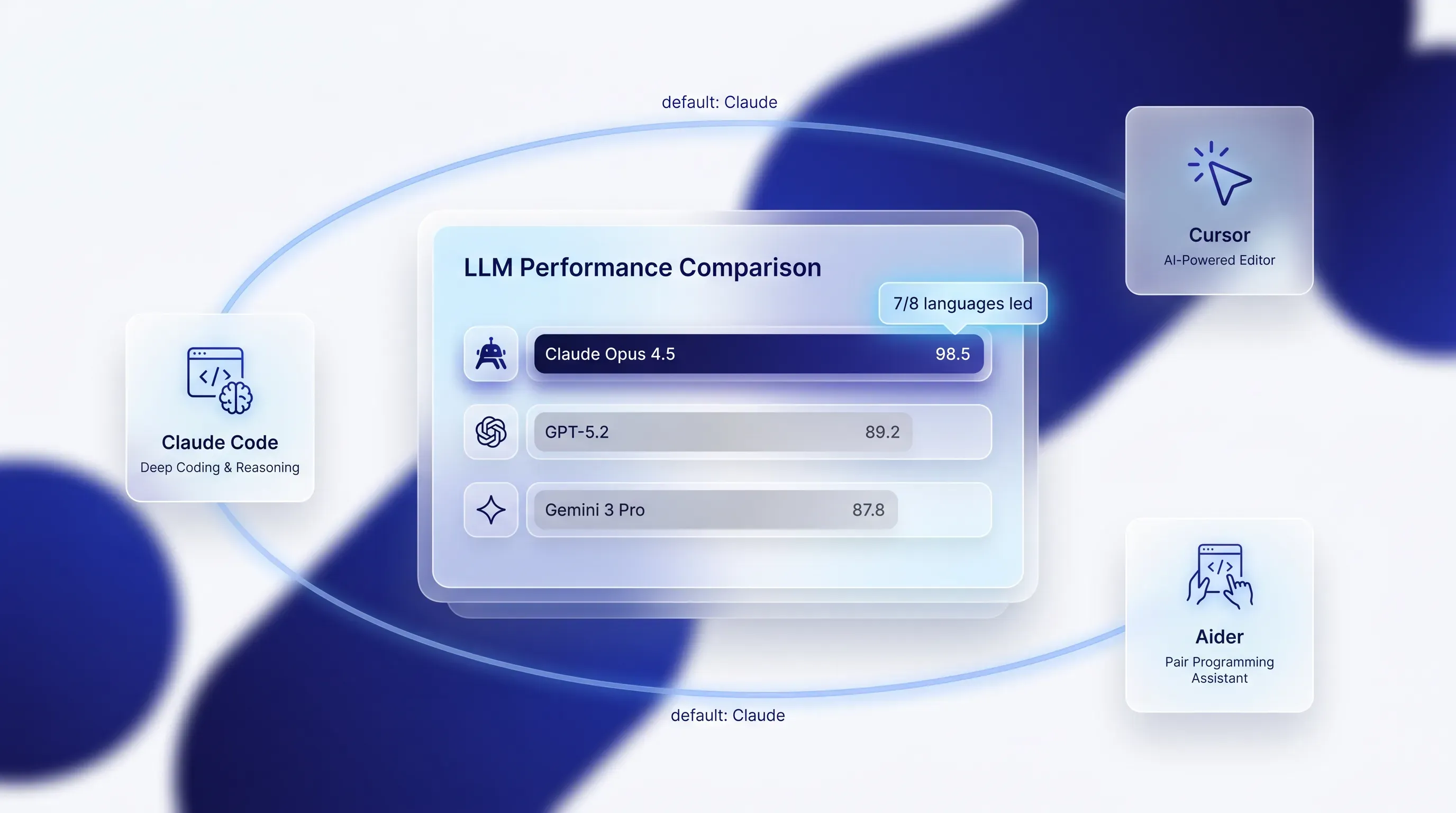
Claude is the pick, and the benchmarks back what developers report. In ChatGPT vs Claude vs Gemini coding benchmarks, Claude Opus 4.5 resolves 80.9% of SWE-bench Verified tasks, ahead of GPT-5.2 at 80.0% and Gemini 3 Pro at 76.8%. It also leads seven of eight languages on the multilingual version. Claude Code, the terminal tool, keeps Claude in the best AI assistant discussion and is why Cursor and Aider default to it. OpenAI Codex is a strong second and worth having for quick prototyping. Gemini fits teams already deep in Google's stack, where its Workspace ties and cheap API make it easy to justify for lighter dev work.

A glassmorphic tech hub illustration featuring a central frosted-glass card with a bar chart comparing AI models, surrounded by smaller cards.

Buy Claude for your engineers. It hands back multi-file fixes with fewer hallucinated APIs, which means less rework and less time spent checking whether a function it called is real.

Legal and contract review

The task for ChatGPT vs Claude vs Gemini: drop a long software development agreement into the model and ask it to flag risky clauses. You can also ask it to draft a first-pass contract from your terms. This is not legal advice, and nothing the model produces replaces a lawyer. Here, hallucination rate matters more than anywhere else, because an invented clause or a misread liability cap can cost you real money.

Claude is the pick, and the reason is how Anthropic trained it. On the AA-Omniscience benchmark, Claude posts the lowest hallucination rates among major models because it is calibrated to refuse when uncertain. For legal work, a model that says "I cannot confirm this" is structurally safer than one that fills the gap with a confident fabrication. Claude also handles long documents well, with a 200K token window that holds roughly 500 pages, so a full agreement fits in one pass. Even the best models hallucinate on legal queries around 6.4% of the time, so you verify everything regardless.

Use Claude for early-stage contract work before your lawyer reviews. Its caution is the feature you want when the cost of a wrong answer is high.

Content and SEO

The task for ChatGPT vs Claude vs Gemini: give the model a brief and a target keyword. Add a sample of your existing writing, then ask for an on-brand article draft or a set of SEO outlines. What counts is writing quality and whether bloated, bullet-heavy output forces extra editing before publishing.

Claude takes this. It matches a supplied voice better than the other two, so the draft reads like your brand instead of like AI, and that cuts edit time sharply. ChatGPT is close and more flexible if you want to spin variations fast. Gemini's edge is real-time search, so it pulls current facts and fresh sources into a draft, which matters for anything time-sensitive. If you ship content regularly and care about voice, Claude's first drafts need the least cleanup.

Pick Claude if edit time is your bottleneck. Reach for Gemini as a second tool when a piece leans on current data that needs live search. For the best AI assistant on branded writing, Claude's style matching is the deciding factor.

Data analysis

The task for ChatGPT vs Claude vs Gemini: hand the model a messy spreadsheet and ask for a usable chart plus a short written summary of what the numbers say. You care about correct figures and usable output from a larger dataset. Unsupported insights are a failure.

Gemini wins for most lean teams because of where the work already lives. It integrates natively with Google Sheets, so analysis happens inside the file. Its 1 million token context swallows large datasets whole. Claude is stronger when you need clean file output and careful written summaries, and its Excel beta extends that. ChatGPT's code interpreter runs solid analysis too, though for a Workspace team the friction of moving data out and back is the deciding cost.

Pick Gemini if your data sits in Sheets and you run light analysis without a dedicated data team, making it the best ai for business for that workflow. The native integration removes the step where most errors creep in.

Customer support

The task: point the model at your help-center knowledge base and ask it to draft accurate replies. You can also use it to summarize a long, messy ticket thread. Accuracy against your source docs is the whole job. The best AI assistant for support also has to handle missing answers and hold tone steady across hundreds of replies.

Claude is the pick. Its habit of refusing when it lacks support is what you want when a customer asks about a gap in your knowledge base, because the failure mode is "I do not have that." That same calibration keeps its replies anchored to the source documents you feed it. ChatGPT holds tone consistency well at scale and is a fair alternative. Gemini fits if your support stack already runs on Google and you want summaries pulled from Gmail threads.

Stand up your small support function on Claude. Grounded, on-brand answers with a safe failure mode beat a chatty model that occasionally invents a refund policy.

What ChatGPT vs Claude vs Gemini cost

Capability decides the shortlist. Budget decides the seat. Here is the part most ChatGPT vs Claude vs Gemini comparisons skip, and the part you actually have to defend to whoever signs off.

On per-seat pricing, ChatGPT and Claude land close. ChatGPT Business, renamed from Team in August 2025, runs $25 per user monthly on annual billing. Claude Team standard seats also sit at $25 per seat monthly on annual billing with a five-user minimum, though its Premium seat that includes Claude Code jumps to $150. Gemini works differently. Google folded it into Workspace in 2025 after it retired the standalone add-on, so it now rides inside plans like Business Standard at around $14 per user monthly. If your team already pays for Workspace, Gemini is the cheapest seat by a wide margin.

API pricing is a separate budget line, and it is where the gap widens for anyone building automations. A few numbers to weigh:
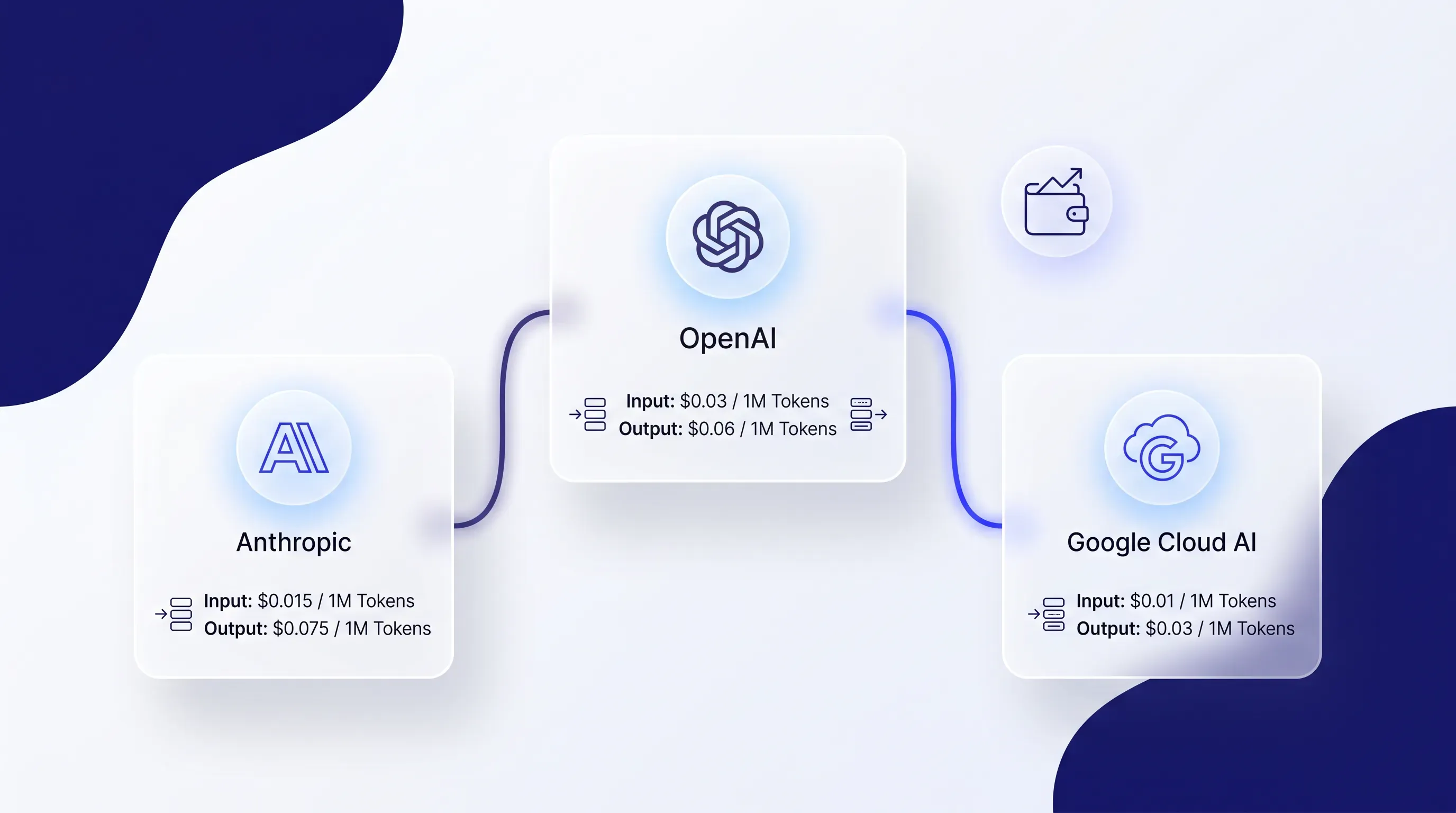
A bright, glassmorphic tech visual with three frosted-glass cards representing AI providers, linked by glowing connectors on a near-white background.

The trade-off comes down to how your team consumes AI. If people use it through a chat window all day, per-seat subscriptions are predictable and simple, so the best AI for business choice is the tool that wins your top task. If you are building a support bot or a document pipeline that burns tokens at volume, a cheaper model tier can cut spend sharply, and dropping to Gemini Flash-Lite for high-volume jobs saves real money against Claude Sonnet. Model your top workflow at expected volume before you commit, because the right answer for a 5-person chat team and a team running a million API calls a month are not the same. The best AI for business budgeting is the one that matches your actual consumption pattern.

Pick the best AI for your team

Start from two things you already know: your top two or three use cases, and the software your team lives in. Those two inputs point to the best AI for business for your team faster than any benchmark.

Walk it through like this:

  1. List your top two or three tasks from the six functions above. Whatever you run most is what the tool has to win.

  2. Name your stack. If you are on Google Workspace, that pulls hard toward Gemini for the seat you already half-pay for.

  3. Match the primary tool to your heaviest task. Coding and contract review lean Claude. Support and branded content lean Claude too. Sales outreach and fast iteration lean ChatGPT. Data in Sheets leans Gemini.

  4. Add a second tool only for one specific job that your primary loses. A Claude-first team keeps ChatGPT for outreach. A Gemini-first team keeps Claude for contract review.

The patterns from the research hold up. Google Workspace teams lean Gemini because the integration and price are already there, and document-heavy teams lean Claude because of its caution and long-document handling. Running two tools is normal, not a failure of discipline, and even Amazon's $4 billion Anthropic investment reflects that large firms keep multiple models for different jobs. The best AI for business is whichever one wins the task you run most. So before you buy seats across the team, trial your top pick on a real task from your own workflow, since the outcome you care about is your work.

At Pollume, we help founders and lean teams choose and wire the right AI stack into their product and operations instead of defaulting to one vendor. If you are weighing ChatGPT vs Claude vs Gemini for your team's real workflow, talk to Pollume about mapping your top use cases to a concrete tool and API plan.

Test it on one real workflow before buying seats. For a ChatGPT vs Claude vs Gemini trial, use the same brief, source files, and success criteria for each tool, then score the output on accuracy and cleanup time. Run the test with the people who'll use it weekly.

Yes, if each tool has a named job. Assign one default tool for daily work and one exception tool for a task the default loses, such as Claude for contract review beside ChatGPT for outreach. Write the rule in your team handbook so people don't choose by habit.

Avoid putting sensitive customer records or credentials into public AI chats unless your company has approved the provider settings and contract terms. Redact test files before upload. For production workflows, use business plans or API setups that your team has reviewed for retention and access needs.

Choose seat pricing first when humans use AI in chat, and API pricing first when software calls the model at scale. A five-person team drafting copy has different costs than a ticket bot processing 10,000 messages. Estimate monthly call volume and average token size before comparing providers.

Involve a developer before purchase when AI connects to your product, database, or support system. They can check API limits and failure handling before the workflow reaches users. Pollume helps founders map those use cases to a tool and API plan without treating one model as the default answer.

Book a call

Book a time that works best for you

You Might Also Like

Discover more insights and articles

Futuristic digital workspace infographic with holographic workflow panel, human figures collaborating with glowing AI icons, deep blue background.

AI Business Automation Fails at the Workflow, Not the Model

This article reframes AI business automation as a three-layer maturity model and shows you which workflow to rebuild first. You'll get concrete before-and-after examples for support and sales workflows, then a content approval example plus an audit checklist to diagnose exactly where your automation is stuck.

A diverse group of professionals collaborates in a futuristic digital workspace with holographic panels and glowing charts, set in cool ambient lighting.

Founders' AI Cost Reduction Audit: Where to Start

This article shows early-stage founders and small agency owners where AI quietly adds cost before it removes any, then hands over a five-point audit and a simple decision framework to turn those leaks into real savings you can measure.

A futuristic digital workspace with founders and executives collaborating around a holographic 'build vs buy' decision matrix.

Build vs Buy AI: The Decision Framework Founders and CTOs Actually Use

Most build vs buy AI decisions get made in a room where half the people are arguing from instinct and half from vendor pitch decks. This guide gives you two concrete tools to cut through that noise: a five-dimension scoring matrix and a readiness audit. The next time this lands on your agenda, you walk in with a framework instead of an opinion.

A futuristic digital workspace with a founder, lawyer, and developer interacting with a holographic contract panel and glowing icons.

Software Development Contract: The MSA, SOW, and Why Most Founders Sign Them in the Wrong Order

In this article, we break down the software development contract paperwork a first-time founder gets handed before hiring a development team, and why it is almost never a single document. You will learn what each piece does and the order to handle them in before any code gets written.